Wednesday, October 17, 2018
Tuesday, August 21, 2018
Wednesday, July 11, 2018
Turbo C++ 3.2.2.0 For Windows XP,7,8,10
Turbo C++ is a discontinued C++ compiler and integrated development environment and computer language originally from Borland. Most recently it was distributed by Embarcadero Technologies, which acquired all of Borland's compiler tools with the purchase of its CodeGear division in 2008. The original Turbo C++ product line was put on hold after 1994 and was revived in 2006 as an introductory-level IDE, essentially a stripped-down version of their flagship C++Builder. Turbo C++ 2006 was released on September 5, 2006 and was available in 'Explorer' and 'Professional' editions. The Explorer edition was free to download and distribute while the Professional edition was a commercial product. In October 2009 Embarcadero Technologies discontinued support of its 2006 C++ editions. As such, the Explorer edition is no longer available for download and the Professional edition is no longer available for purchase from Embarcadero Technologies. Turbo C++ is succeeded by C++Builder.
Requirment
Windows xp 7 8 10
.NET FIRMWORK 4.5
Wednesday, June 13, 2018
Sunday, June 3, 2018
Saturday, May 12, 2018
Friday, May 4, 2018
TypingMaster Pro v10.1.1
TypingMaster Pro v10.1.1.849
Test & Train Your Typing Skills
Double your typing speed. Teach keyboarding in a fun way. Test your speed and accuracy. Play top-notch keyboard games. Find it all from Typing Master!
TypingMaster Pro is an adaptive touch typing tutor for Windows, that helps you to reach professional typing skills.
As a result you will type up to five times faster without errors and acquire better working ergonomy by decreasing muscular stress.
Here are some key features of "TypingMaster Pro":
<*>TypingMaster adapts to your personal needs by giving immediate feedback on your progress.
<*>TypingMaster is focusing particulary on those areas that need extra training.
<*>You can advance in your own schedule and choose freely the length of each training session.
Monday, April 23, 2018
Factory Reset Protection (FRP) And Applications
Android devices provide built-in security features you can use to protect your device and information, including screen locks and data encryption. Data protection, or Factory Reset Protection (FRP), is a security feature on Android devices with Lollipop 5.1 and higher.
FRP is automatically activated when you set up a Google Account on your device. Once FRP is activated, it prevents use of a device after a factory data reset, until you log in using a Google username and password previously set up on the device.
Aamirnoori
Tuesday, March 27, 2018
(3uTools) An All-in-One Tool for iOS Devices
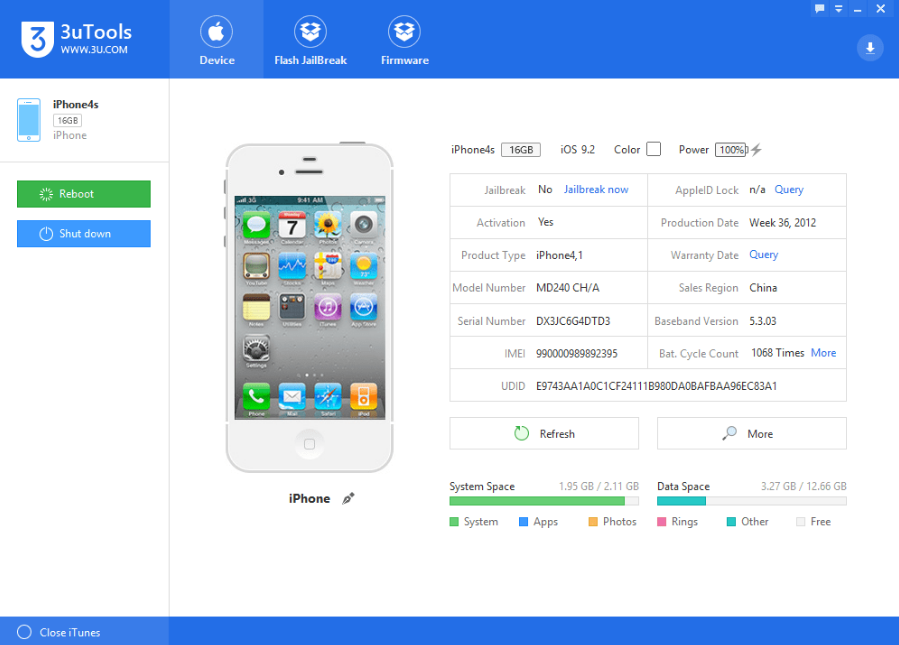
3uTools is a tool for flashing and jailbreaking Apple's iPhone, iPad, iPod touch, provides two ways, Easy Mode or Professional Mode, to flash Apple mobile devices.
3uTools (Version: V2.20) makes it so easy to manage apps, photos, music, ringtones, videos and other multimedia files.Fully view iOS device' s different statuses, including activation, jailbreak, Battery and iCloud lock statuses, as well as detailed iOS & iDevice information.
For Download
3uTools (Version: V2.20) makes it so easy to manage apps, photos, music, ringtones, videos and other multimedia files.Fully view iOS device' s different statuses, including activation, jailbreak, Battery and iCloud lock statuses, as well as detailed iOS & iDevice information.
For Download
Saturday, March 24, 2018
Universal Samsung FRP Bypass Applications
Get All FRP Bypass Application Free
- Android 8 Google Account Manager.apk
- Android 6 Google Account Manager.apk
- Android 5 Google Account Manager.apk
- FRP Bypass 1.0.apk
Subscribe to:
Posts (Atom)